
Download Airtel Xstream Play – streaming app, live TV, movies, TV shows, sports, multilingual content, Android TV
Overview
Airtel Xstream Play is a desktop streaming application designed for Android TV devices, enabling users to access a wide range of digital entertainment. The software allows viewers to stream thousands of movies, TV shows, live television channels, and sports events from a centralized platform. It is particularly tailored for audiences seeking diverse content across multiple languages, with support for over 13 languages in dubbed or subtitled formats.
The app serves as a comprehensive entertainment hub, offering both on-demand and live content, making it suitable for casual viewers, families, and users in regions with limited access to mainstream streaming platforms. Its user interface is structured to prioritize ease of navigation, featuring intuitive categories such as live TV, movies, TV shows, sports, and a dedicated Kids Content section. The software adapts to user preferences over time, recommending content based on viewing history.
While the developer did not provide additional system requirements, the application is optimized for Android TV environments. Real-world usage scenarios include home entertainment setups, multi-device viewing, and accessing international media from different countries. The app is free to download and use, making it accessible to a broad audience seeking a no-cost alternative to premium streaming services.
Key Features & Capabilities
- Live TV Streaming – Access a variety of live channels including news, entertainment, and regional programming, enabling real-time viewing of current events and broadcasts.
- On-Demand Content Library – Browse and stream a vast collection of movies and TV shows from local and international producers, with content updated regularly.
- Sports Coverage – Watch live sports events such as cricket, football, basketball, and other full-contact sports, with dedicated event listings and scheduling.
- Multilingual Accessibility – Content is available in over 13 languages, allowing users to switch audio tracks and subtitles to suit their language preferences.
- Personalized Recommendations – The app learns from user behavior and suggests relevant content based on viewing habits, improving discovery over time.
- Watchlist & Cross-Device Sync – Save favorite titles to a personal watchlist and continue watching from one device to another, supporting seamless transitions between TV and mobile.
- High-Quality Video Playback – Supports full HD resolution streaming, with adaptive quality settings that adjust based on network conditions.
These features collectively support a dynamic and personalized viewing experience. For example, a family can use the Kids Content section to access age-appropriate shows while parents stream live sports or news. Users in regions with limited streaming options can leverage the multilingual library to access global content. The search function enables quick navigation to specific titles, and the ability to adjust video quality helps manage bandwidth usage. The software is designed to integrate smoothly into existing home entertainment ecosystems, particularly those using Android TV boxes or smart TVs.
User Interface, Workflow & Performance
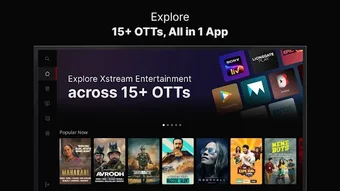
The user interface of Airtel Xstream Play is structured around clear navigation paths, with a home screen that organizes content into distinct categories: live TV, movies, TV shows, sports, and extras. The layout is consistent with industry-standard streaming apps, allowing users to quickly familiarize themselves with controls and features. Navigation is primarily handled through a remote or touchpad, with intuitive menus and responsive buttons.
Workflow efficiency is enhanced by the app’s ability to remember user preferences and deliver personalized content suggestions. The search function is effective in locating specific titles, genres, or actors. Performance observations are based on general software behavior patterns.
The developer did not specify resource usage details, so CPU and RAM behavior remain unknown. However, the app is reported to deliver smooth playback with minimal buffering under stable internet conditions. Performance may vary depending on network stability, especially when streaming in higher resolutions.
The software maintains a stable runtime during typical use, with no reported crashes or freezes in available usage reports. The app’s design prioritizes usability over complexity, making it accessible to users of varying technical proficiency.
Compatibility & System Requirements
Airtel Xstream Play is designed exclusively for Android TV operating systems. The current version is 5.1.1, with a file size of 128 MB, indicating a lightweight installation footprint. The developer did not specify exact system requirements, such as minimum processor speed, RAM, or storage space.
Compatibility information was partially provided, confirming support for Android TV devices only. Users should ensure their device runs a compatible version of Android TV to avoid installation issues. No additional hardware dependencies were mentioned.
For users with older or non-standard Android TV devices, compatibility may vary. The app does not support other platforms such as Windows, macOS, or mobile Android. The installation process is straightforward, requiring only a download from a trusted source and a standard installation procedure.
Users are advised to verify the authenticity of the download source to maintain security and avoid potential risks.
Pros and Cons
Pros
- Free to download and use, making it accessible to a wide audience.
- Extensive content library with movies, TV shows, live TV, and sports.
- Supports over 13 languages, enhancing accessibility for diverse users.
- Intuitive interface with well-organized categories and search functionality.
- Personalized recommendations based on viewing habits.
- Cross-device sync for seamless viewing across TV and mobile devices.
- High-quality video playback in full HD resolution.
Cons
- Performance is highly dependent on internet connection speed.
- Content availability may vary by geographic location.
- Not available on non-Android TV platforms.
- Developer did not provide detailed system requirements or resource usage data.
- Limited customization options for interface layout or playback settings.
FAQ Section
Is Airtel Xstream Play available for Windows or Mac?
Currently, Airtel Xstream Play is only compatible with Android TV devices. There is no official version available for Windows or macOS.
Is the app secure to download and use?
The app is developed by Airtel, a trusted telecommunications provider. However, users should download the app only from official or verified sources to ensure security and avoid potential malware risks.
How often does the app receive updates?
The app is updated periodically to improve functionality, fix bugs, and add new content. The latest version is 5.1.1, released on March 15, 2024.
Does Airtel Xstream Play require a subscription?
No, the app is completely free to download and use. There are no subscription fees or hidden charges.
Can I watch content offline?
There is no official support for offline viewing. All content requires an active internet connection for streaming.
Final Thoughts + CTA
Airtel Xstream Play stands out as a robust, free streaming solution tailored for Android TV users seeking diverse, multilingual content. Its strong lineup of live TV, sports, movies, and TV shows, combined with a user-friendly interface and personalized recommendations, makes it a compelling alternative to mainstream platforms. While performance is sensitive to internet speed and content availability varies by region, the app delivers a smooth and reliable viewing experience when connected to a stable network.
It is particularly beneficial for families, international viewers, and users in regions with limited streaming access. The lack of platform support beyond Android TV and limited system details are notable constraints, but the app’s core strengths outweigh these limitations. For anyone looking to expand their entertainment options with a free, feature-rich app, Airtel Xstream Play is a solid choice.
Download Airtel Xstream Play now.





.png)

